Tamper-evident timesheets: what they can and can't prove
A timesheet is a claim. You type some hours into a document, put your name at the bottom, and send it to somebody who was not in the room. They can believe it or not believe it, and that is the entire mechanism. Nothing about the document itself distinguishes forty honest hours from forty invented ones.
This is fine right up until it isn't — a client who queries an invoice, a finance team that wants "backup", a dispute where the only thing you can offer is your word repeated more firmly. The industry has an answer to this, and the answer is surveillance.
The surveillance answer, and why we didn't take it
Screenshots every ten minutes. Webcam checks. Keystroke logs. A live activity feed with your name on it. These tools solve the trust problem by removing the need for trust: the client watches you work, so they don't have to take your word for anything.
It does work, in the narrow sense. It also treats the person doing the work as the thing to be controlled, and it hands a third party a detailed record of someone's day — what they typed, what was on their screen, what they had open in another window at lunchtime. Deski doesn't collect any of that, and the architecture won't allow it: keyboard activity is stored as a count with no record of which keys, mouse activity has no coordinates, and none of it leaves the machine.
So the question we actually had was narrower and more interesting. Can a timesheet carry any weight at all without watching the person who made it?
What Deski does instead
Deski keeps a running record of every time block as it writes it, with each entry sealed against the one before. Change an entry after the fact and the seal on everything that follows stops matching. When you print a timesheet, the app re-checks every block in the range against that record and prints the result at the top of the page.
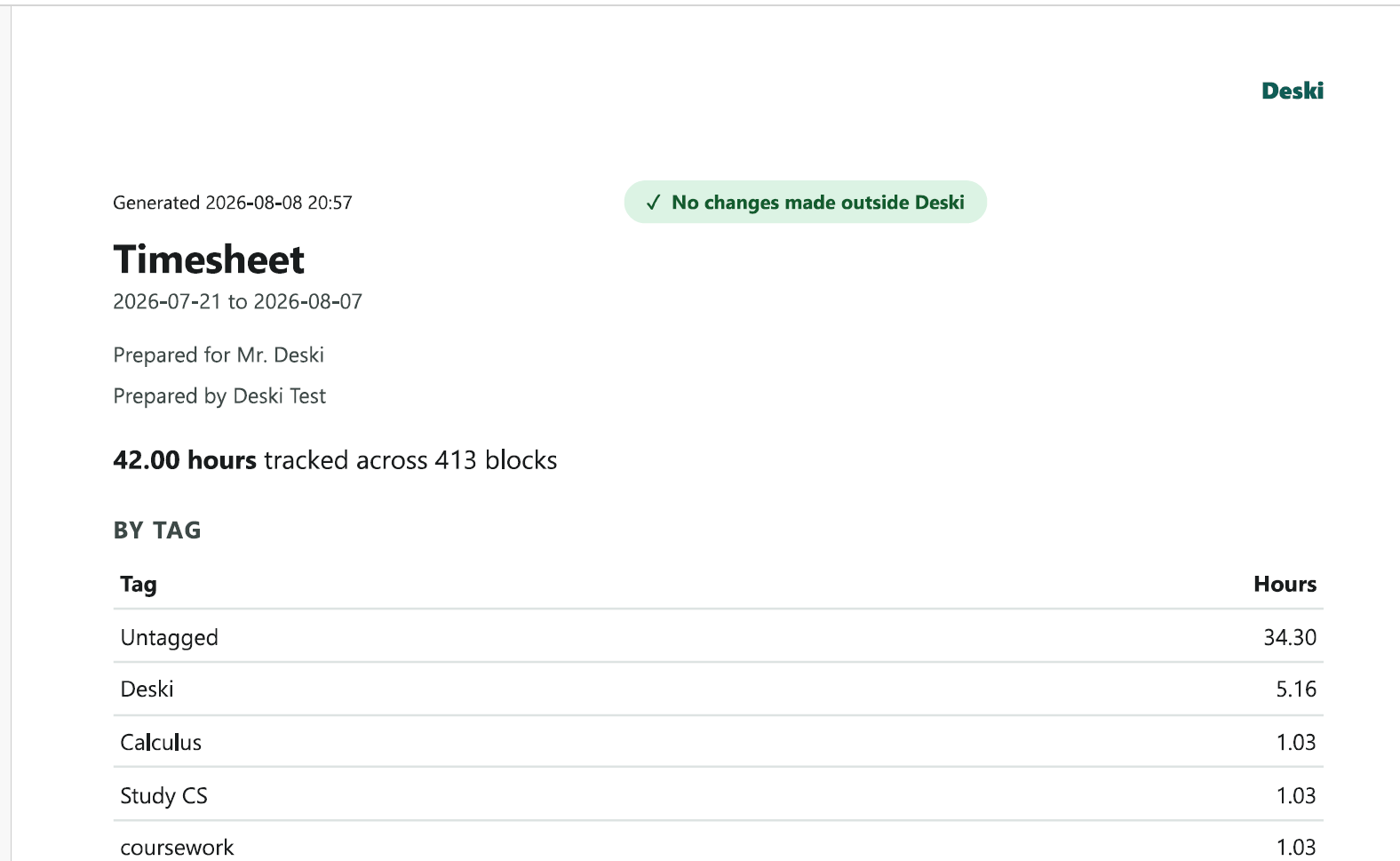
There are three possible answers, not two. The sheet either says nothing was changed outside Deski, or says something was and names which blocks, or says it cannot tell for that period. That third answer is not a pass, and it prints in grey rather than green for exactly that reason. If a sheet you expected to come back clean comes back "can't check", something has happened to the file and you should want to know.
What the tick actually proves
Here is the part most products would leave vague, because vagueness sells better. A green tick means the blocks on that sheet have not been casually edited since Deski recorded them. Somebody opening the database in a spreadsheet tool and changing a number gets caught. That is a real and common failure mode, and catching it is worth something.
It does not mean the hours were worked, and it cannot mean that. No software running on your own machine can prove to a third party what you were doing — your machine is yours, the software runs with your permissions, and anyone telling you otherwise is selling you something. There are two more limits worth stating plainly:
- History is taken on faith. Everything already in the file when you upgraded is adopted as genuine, because a record has to start somewhere. The check gets stronger the longer you use it, and it is weakest on day one.
- It is evidence, not proof. It raises the effort required to fake a timesheet from "edit a number" to "understand and rewrite the record", on a local file you control. That is a meaningful step, and it is not the same as being impossible.
We would rather write that down than let you find it out during an argument with a client. A guarantee you can't keep is worse than a smaller claim that holds.
Two totals, because a tool that refuses to print is useless
The obvious thing to do when a check fails is to block the export. Refuse to print. Make the user fix it first.
That instinct is wrong, and it is wrong at the worst possible moment — eleven at night, invoice due, a tool announcing that your month is unprintable and offering you a settings screen. So a flagged sheet in Deski still prints. It just stops having a single total.
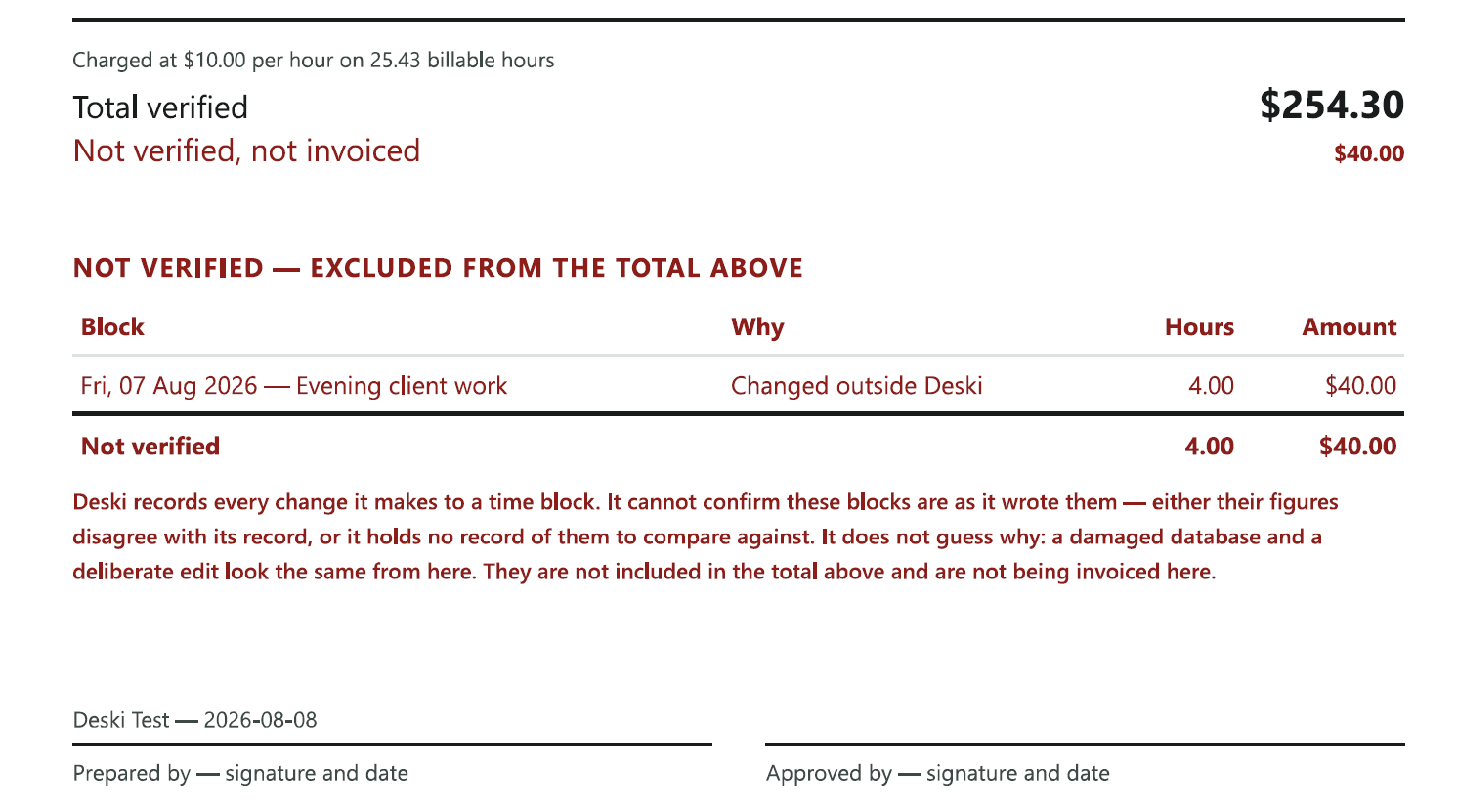
Your client pays the total that is certain and can ask about the rest. That is a conversation rather than an accusation, and it is a much better position than either alternative — a sheet that quietly dropped the disputed hours, or one that quietly included them.
Deleting is never the default
When something is flagged, Deski asks one question before it offers you anything: are those hours real work you need to keep? Everything else follows from the answer, and the options each state their cost before you pick one.
Restoring a block puts it back to the figures Deski originally wrote. It can only write back what the record already holds, so it can never invent hours, and a block Deski has no record of is left exactly where it is rather than removed — still on the sheet, listed and not invoiced.
The destructive option exists, but it is never recommended, and there is a specific reason for that. When almost everything is flagged at once, the cause is nearly always a damaged or rebuilt database file — disk trouble, a repair tool, a sync service reconciling two copies — rather than anyone editing blocks one at a time. A tool that led with "delete the bad blocks" in that situation would be cheerfully offering to erase a year of your own work.
Hours you add by hand say so
One consequence of all this: we deliberately removed every route that quietly turns unrecorded time into verified time. There is no button that launders an hour into a green tick.
But people forget to start timers, and work happens away from the keyboard, and a tracker that can't record a genuine meeting is not much use. So the front door is open and clearly labelled instead. You can add a past entry for hours you worked but didn't time; those hours count towards your totals and are billable, and the timesheet lists them separately as untracked alongside the hours Deski recorded automatically and the ones you timed by hand.
Nothing is hidden and nothing is inflated. The reader gets to weigh three different kinds of hour instead of being handed one number and asked to trust it. That is the whole design, really.
What this is for
This doesn't make you trustworthy. Nothing a piece of software does can make you trustworthy. What it does is make your record checkable — and make the sheet honest about the places where it can't vouch for itself.
For most people the value shows up as an absence: an invoice that goes out and gets paid, with a line at the top nobody has to think about. It matters on the day someone asks, and on that day you want a document that already answered the question rather than a memory you have to defend.
Tamper checking shipped in Deski 0.1.10 and is on by default — there is nothing to turn on. The mechanics are written up in the documentation, including what to do if a report does come back flagged.